How to fix the 2004 Renault Clio radio

After disconnecting or replacing the battery in a 2004 Renault Clio (and similar models), it’s very common for the radio to get locked. If you don’t have the security code handy, you might end up in a situation where the radio emits constant beeps or shows an “ERROR” message that doesn’t allow you to input anything.
After a couple of days of testing and searching internet forums, I’ve managed to find the key to getting everything working and re-entering the code, so I’m writing it down here in case it helps someone else:
1. The Problem: Radio Locked or Beeping
If you’ve tried pressing random buttons (like 2 and 5) and the radio works but won’t stop beeping, or if it simply won’t let you enter the code because it says “ERROR,” you need to force a reset of the security mode.
2. Unlocking the System
If the radio is not asking for the code:
- Simultaneously press and hold buttons 2, 5, and the Power button.
- Keep them pressed for 2 full minutes (your fingers will hurt doing this, yes).
- If your fingers are still intact, the screen should change and ask for the code again (usually appearing as four zeros or dashes).
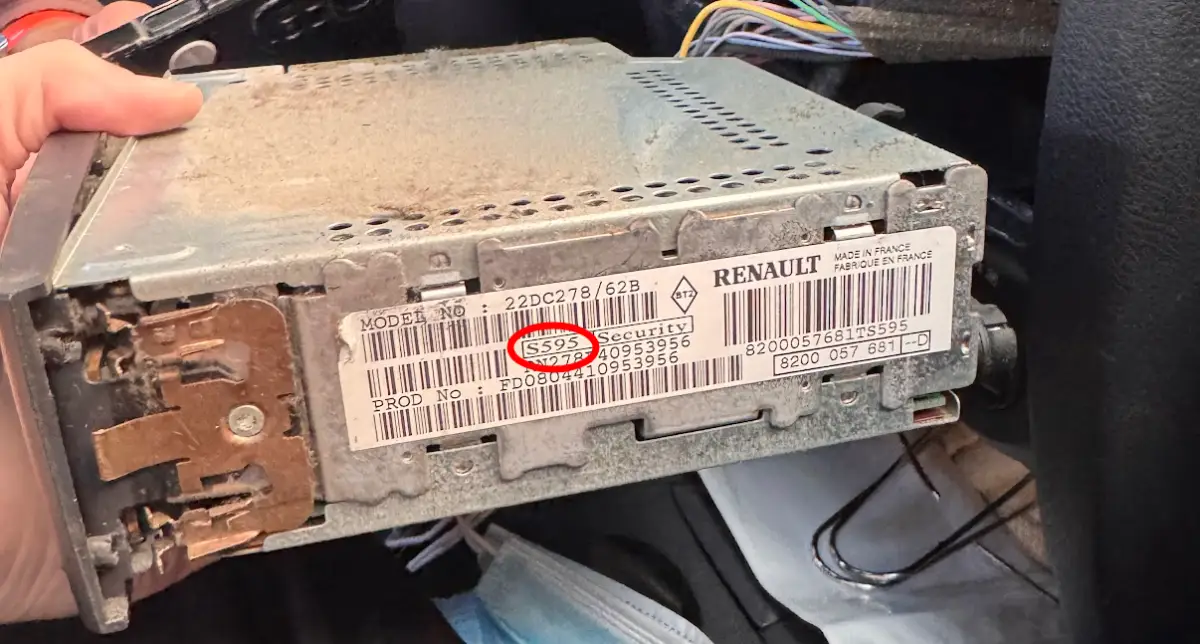
Dismantled radio, where the pre-code can be seen in red
3. How to Get the Code if You Don’t Have the Manual
If you don’t have the car manual, you’ll need the radio’s pre-code:
- Remove the radio: You’ll need extraction keys (or thin clips/screwdrivers) to pull it out of its slot. It has a trick to it, so I recommend watching a YouTube tutorial so you don’t mess it up.
- Find the sticker: On the back or side, there will be a label with several codes. Look for one that starts with a letter followed by three numbers (e.g.,
Z123). That is your pre-code. - Generate the code: There are free apps on the Play Store or App Store (search for “Renault Radio Code”) where you enter that pre-code, and it calculates the 4-digit unlock code using an algorithm. There is also a website [Renault / Dacia Radio Code Generator] that does the same (you can check the code here: GitHub).
4. Entering and Confirming the Code
Once you have your 4-digit code:
- Enter the numbers using the 1, 2, 3, and 4 buttons on the radio (press each one repeatedly until you reach the desired digit).
- To confirm, press and hold button 6 for a few seconds until you hear a confirmation beep.
- In my case, it kept asking me to confirm options, but after pressing 6 a couple of times, it is now working perfectly.
And yes, I know this guide is very specific, but after spending a good while looking for how to do it, I hope it helps someone else in the future. Good luck!